
IT/OT Builds 15 min
Inside the New HiveMQ Platform: Full Walkthrough | IT/OT Builds
In episode 1, Shashank Sharma explained why HiveMQ is moving from products to a platform. In this episode, Kudzai Manditereza (Senior Industrial Solutions Advocate at HiveMQ) shows it to us, live, on our fictional bakery Sweet Harmony Treats.
In This Episode
- Kudzai Manditereza demos the new HiveMQ platform on Sweet Harmony Treats, the IT/OT Insider's simulated bakery, running in Docker with a local HiveMQ broker.
- Raw MQTT topics are just strings, Kudzai notes; the governed namespace adds types, so Sweet Harmony Treats is an enterprise and Munich a site, each with its own metadata.
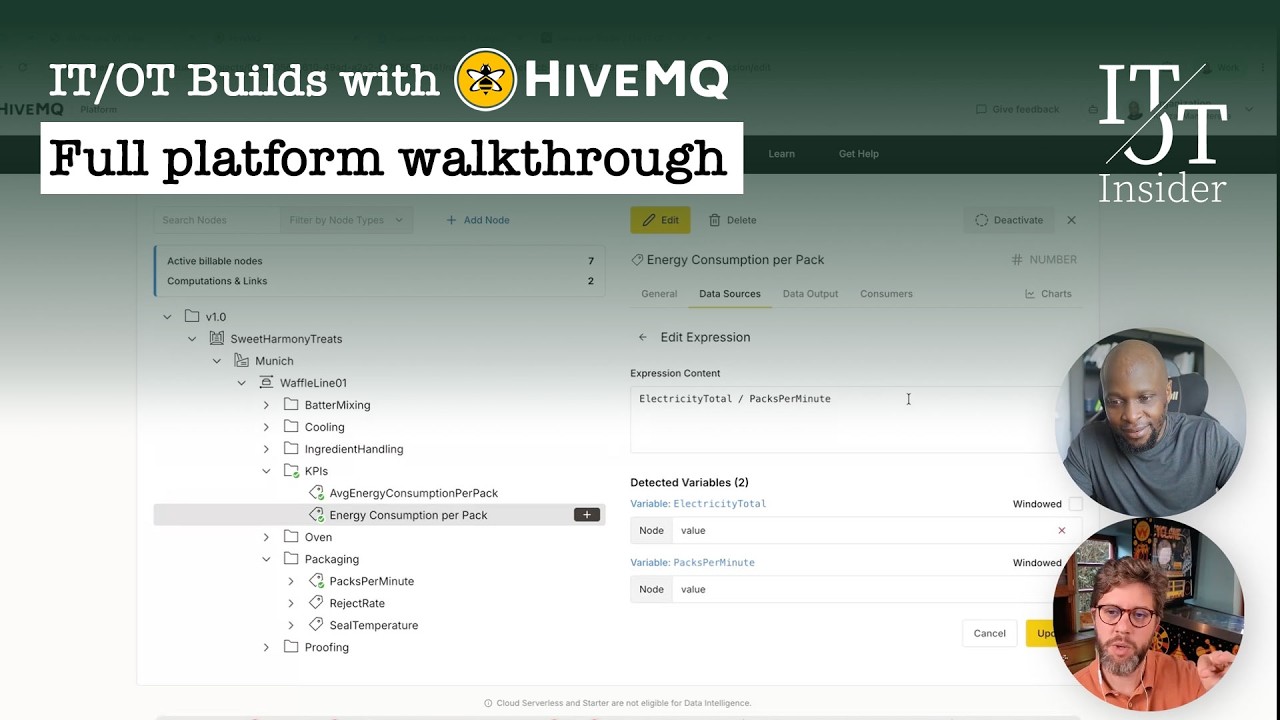
- The demo KPI, energy consumption per pack, is defined in the platform but calculated at the edge, and the bakery's HMI subscribes to it, so data flows out of the system and back in.
- Defining KPIs centrally and pushing them to the edge avoids every factory calculating them differently, as often happens with OEE, so sites can be compared with confidence.
- An agent in the Act layer watches a moving average of the KPI rather than the raw value, which keeps token costs down, and follows a sense, reason, act and reflect workflow.
- The agentic capability is still in public preview; David expects agents to be adopted in industry, saying the open question is how fast.
From Product Pitch to Uncut, Step-by-Step Tutorials
00:00 – 01:08David sets up the second IT/OT Builds video with HiveMQ. After Shashank Sharma's introduction to the move from products to a platform, Kudzai Manditereza now shows the platform itself, clicking through its capabilities while David asks questions.
The videos after this one switch to tutorial mode: every step, uncut, so viewers can follow along and build the same thing themselves, from connecting to contextualizing.
“We aren't even cutting the video. So these are things you really can follow yourself if you wanna build the thing we've been building.”
David Ariens · 00:00
Meet Kudzai, and the Plan for Sweet Harmony Treats
01:08 – 03:07David welcomes Kudzai back; he has been on the podcast before, including an episode on MQTT versus OPC UA. Kudzai introduces himself as Senior Industrial Solutions Advocate at HiveMQ, focused on thought leadership around smart manufacturing, the unified namespace and AI, and he also runs a channel and podcast on AI in manufacturing.
David outlines the goal: connect to the SCADA system of the IT/OT Insider's fictional industrial bakery, Sweet Harmony Treats, deploy a broker, and get data flowing into the platform. He asks Kudzai for a teaser of the environment and the end result.
“I lead more on the advocacy side of things, with thought leadership around smart manufacturing, unified namespace, AI and all the topics that really talk about industrial digitalization.”
Kudzai Manditereza · 01:47
The Demo Setup: A Simulated Bakery and a Broker in Docker
03:07 – 05:39Kudzai explains the aim: show practically how to onboard equipment onto the platform, contextualize the data, analyze it and act on it, so viewers can recreate it in their own environment.
On his laptop, Docker runs a HiveMQ broker alongside a container simulating the Sweet Harmony Treats factory, which publishes to the broker. Some raw MQTT tags are still flowing at the edge without being part of the governed namespace; bringing them in, and building what you'd call a unified namespace, is what the series will show.
“There's still some raw MQTT tags flowing through that broker at the edge that we haven't brought into the governed namespace yet.”
Kudzai Manditereza · 04:28
Beyond Topic Strings: A Typed Namespace with Enterprises and Sites
05:39 – 06:41Inside the governed namespace, Sweet Harmony Treats is no longer just part of a topic path: it has the type enterprise. Kudzai points out the limit of plain MQTT, where a topic is only a string and nothing tells you what an enterprise is; David adds that the same freedom applies to payloads.
The same goes for sites, which carry their own metadata, such as an address. The point isn't only to connect and structure data nicely, but to create actionable information for someone on the shop floor.
“It's a string, so there's no way to actually tell what an enterprise is.”
Kudzai Manditereza · 05:39
An Energy-per-Pack KPI, Calculated at the Edge and Sent Back to the HMI
06:41 – 08:33The use case: the oven consumes electricity and the packing unit counts packs, so how much energy does one pack of cookies cost? Kudzai shows a new KPI folder with an energy-consumption-per-pack calculation, an expression dividing total electricity by packs per minute, with a nod that the maths isn't perfect.
David stresses that the calculation runs at the edge. The vibe-coded Sweet Harmony Treats HMI subscribes to the new data point, closing the loop: data goes out of the system and comes back in. Calculating it on the HMI would be possible, but that's not the point.
“Could you in theory calculate it on the HMI? Yes, of course you can, but that's not the point. The point is that we get data out of the system but also back into the system.”
David Ariens · 07:32
Consistent KPIs Across Factories, and an Agent That Watches Them
08:33 – 13:46Kudzai explains why the KPI is defined centrally: if every factory and line calculates it its own way, as happens with OEE, the business can't compare sites with confidence. Defining the KPI once and pushing it down to the edge keeps it consistent while the calculation runs locally.
The insight can sit on a dashboard, but manufacturers increasingly want to hand it to an agentic system that notices when energy per pack rises and investigates. To avoid wasting tokens on a fluctuating value, Kudzai feeds the agent a simple moving average. He then shows the agent template: triggered on a timer, it reads MQTT topics, connects to an LLM, and follows a sense, reason, act and reflect workflow, with a rising-edge threshold and context about how the factory and KPI work.
“If you let every factory, every line calculate it for you and expose it to the business, you're going to have different ways of calculation.”
Kudzai Manditereza · 08:33
Agents in Public Preview, and Building It All from Scratch Next
13:46 – 15:15David is curious how fast agent adoption will move in industry, and likes that the platform lets people experiment with it, maybe even in production. Kudzai notes the agent capability is still in public preview, not generally available, but can already be tried.
David recaps the series so far: Shashank's product pitch, this walkthrough of what will be built, and next, the technical deep dives, starting with deploying and connecting a broker and getting data flowing into the platform.
“It will happen. That's not the point. The point is how fast.”
David Ariens · 13:46
Full episode transcript raw feed ▸
David: Welcome to the IT/OT Builds, that's the place where we are building solutions to technical problems. I'm still joined by HiveMQ's Kudzai Manitereza and we will be showing you how to deploy their new solutions. So if you want a general introduction, I suggest you go back to the previous video where we were joined by Shashank Sharma and he gave us the introduction into this move from products to the new platform. But in this video, Kudzai will show us their new platform. And we will really be clicking through. this new thing step by step, will really show you all the capabilities. I'll be asking questions, really interesting discussion we had. In the next few videos, we are really going to switch over more from showing it to tutorial mode. In these videos, yeah, we will be clicking through all things step by step. We aren't even cutting the video. So these are things you really can follow yourself if you wanna build the thing we've been building. Super interesting, we'll be connecting, we'll be contextualizing. all cool stuff. David: Kudzai thanks for joining me. So in this video, and this is something really cool. So we're gonna deploy the HiveMQ platform now on our beloved industrial bakery, Sweet Harmony Treats. People will know you. You've also been on my podcast a couple of times. You talked about MQTT versus OPC UA. We also have an article where we talk a bit more about capabilities of HiveMQ Edge, et cetera. I'm gonna link all of those pieces of content in this video, but first of all, for those who don't know you yet, like the 30 minute pitch on who is Kudzai and what are you going to do. Kudzai: Absolutely. Thank you so much. Thank you so much for having me, David. It's always great to be here on your on your on your lovely platform. So yeah, my name is Kudzai Manditereza . I'm senior industrial solutions advocate at HiveMQ, where I really lead more on the you know advocacy side of things with thought leadership around smart manufacturing, unified namespace, AI, and all you know, the the the the the topics that really talk about in industrial digitalization. I I also do run a a a channel and a podcast on AI in manufacturing where I also demonstrate some of these no concepts. So I'm excited to be here. David: Very, very good videos. I'm also going to link to that one as well. Really, really good concepts. So in this first IT/OT build video, as I already explained in the beginning, we're going to make sure that we are able to connect to our sweet harmony treats industrial bakery, SCADA system, whatever you have prepared for us. We're going to make sure that we are able to deploy a broker and we get data flowing into the platform. So maybe as a teaser, could say like, what is the environment we will be connecting to? What will the end results or the end result we're hoping for? Kudzai: Yes, absolutely. Yeah, thanks, David. I mean the objective really of this demo, really want to, you know, you know, get our hands dirty and really break it down. I know you've you know had a lot of you know you know discussions about how HiveMQ platform introduction, but for those of you who didn't really get a a sense to look at, you know, technically how do you actually go about onboarding your your your your your your assets or you know your equipment onto the platform, how can you know, go about actually doing the contextualization, analyzing the data, and then acting on the data. So we're gonna try and give you a comprehensive view of exactly how practically you can step through the platform so that you can recreate this also on your own environment. So I mean the the first starting point over is for us to, you know, talk about the you know the scenario, right? So basically what we're going to do, this is Sweet harmony treats, as David mentioned, which is really a conceptualization of the IT OT Insider team. And what we want to be able to do is to bring this you know, data, connect this data from the shop flow into the platform. And when we do that, as you can see already here, this is the broker that I have, you know, running here locally on my machine. So I've got my Docker. I don't know if David, you can see that, you know. David: Yeah, yeah. Kudzai: Desktop. So basically, we've got this hive MQ running here. And then I've got also another you know Docker container which is simulating our sweet harmony treats factory. So we've got our you know simulation of a real you know environment that is currently running here on my environment and is connected to this MQTT broker, which is what you see right here as the Brave Maison lab. And then from there we're gonna then going to move on to you know. Bring this data into the namespace because as you can see here, there's still some raw MQTT tags that are actually flowing through that, you know, you know site or that that broker at the edge that we haven't brought into the covenant namespace yet. So we're actually going to show you how to do that. And then when we do that, we'll then be able to see this covenant namespace that you're looking at here. So this is the you know, your what you'd call your unified namespace. As you can see here now, our sweet harmonic trees is really now, you know, if you go inside here, you can see that this is actually now of type enterprise. So obviously we all love MQTT, you know, but MQTT topic is really like it's a it's a string, right? It's a you know it's David: Mm-hmm. Kudzai: it's a string, so there's no way to actually tell what an enterprise is, right? So the exact David: You can do whatever you want with those names and basically also with the payload by the way. Kudzai: Yeah, a hundred percent. And you know, same applies with the site. So we can actually tell that this is actually a site, right? And then we've it's got the like the metadata that is associated with that, you know, site, you know, whether it's an address or whatever information that you want to pack in there. And then what we're going to do also is to then, you know, because you know the idea is not of only to just connect data and structure it nice, is to then sort of like, you know, create actionable you know, information that someone on the shop floor can actually, you know, act on. So the, you know, the use case that we're picking here is that our, you know, oven is obviously consuming you know electricity and then we've got our you know packing unit where all these pegged cookies or I don't know what you're manufacturing at that factory, David, but all these David: very nice things to eat. Kudzai: yeah so all those cookies as they are rolling out of the you know line We want to be able to determine exactly how much does it actually cost cost us to you know to to create that one pack of of cookies as far as energy is consumed. So this is the you know active ac actionable information that we want to be able to you know produce out of this no simulation. So you will notice here that I've got a KPI you know folder, which is something that was not originally in the you know MQTT namespace. And what we have what what I've done is that I've then created a new tech or new calculation, a KPI, which is energy consumption per pack So you'll notice that the sources of that calculation here is an expression. And this expression is simply a, you know, electricity total over, you know, pecs per minute. So I know maybe it's not it's not a perfect, you know, no mathematics, but David: It's the, yeah, but the point here is, and this is really interesting, although we are currently using the HiveMQ platform, what is basically, we have Rietje Schenck also explaining that more in the platform video, which you can also find in the show notes. But the most important thing here is these things are calculated, are run at the edge as well. And if you maybe go back to the Sweet Harmony Treats SCADA system, I think interesting. for the audience to see is that here right on the top. So first of all, we're going to send data into the broker, but we're also going to send, well, we also have, we will have the HMI, which you bytecode it pretty cool by the way, is going then to subscribe to that newly created pointer to get that data back into the HMI. So we have this kind of very simple full circle moment. Could you in theory calculate it on the HMI? Yes, of course you can, but that's not the point. The point is that we get data. out of the system but also back into the system. Kudzai: Yeah, a hundred percent. And an even bigger point there, David, is to say from the business side, like this is an initiative from the business side that says that says, okay, we want to be able to to determine exactly how much energy, how much it costs us to, you know, make that one packet, you know, from you know as far as energy is concerned. Right. And if you obviously let every factory, every line calculate it for you and expose it to the business, you're going to have different ways of calculation. You know, as you know, OEE, every factory will have a different way of calculating OEE. So some applies here. You'd have, you know, different factories, different lines actually providing you this data in a way that is not consistent. So it would be difficult for you to at the business level correlate that information to see, I see at factory one, we're actually doing five you know kilowatts hour per pack. And factory two, we're doing three. So for you to be able to confidently Correlate that, you need to have a consistent way of actually calculating that. So, what this allows you is to create the KPIs at a high level and then ship automatically push them down to the edge, and then the inference happens at the edge. Then you know you've got a consistent way of really generating those insights. So that's really super cool. Right. So once we've obviously created this you know insight, we want to be able to then say, no. Of course, it's right here on the dashboard. You know, someone can see it and then they can act on it. So it can be in, you know, you know, OT engineer or it can be on the business side, whoever is taking care of the energy stuff, right? But more and more we see, you know, in a lot of manufacturers starting to want to adopt no agentic AI to say, okay, could we offload this insight to an agency system whereby the agency system would look at this and say, Okay, I noticed that we've now starting to use more energy per pack. More than what we did an hour ago or yesterday. And then this is maybe something that it may need to investigate. Maybe there is a blocked event, maybe there's something that is happening. So that's the power to then say we can then offload this, you know, you know, insight to more of an agentic system to do further investigation and only give you the you know the recommendation as a you know relevant stakeholder to then be able to act on that. So what you see here there before. We hand that information over to the agentic system. What I've then done is then because we don't want to give the agent a fluctuating value. So we don't want the agent going up and down because then obviously again there's token you know cost. So if if the agent has to calculate every minute or reason every minute, it's it's chowing up a lot of no tokens. So we need to sort of like smooth that out a bit. So this is basically what I've done here by creating a A simple moving average, so basic basically a rolling window whereby we're taking this energy consumption calculation per pack and then we're you know putting it into a rolling window and then we'll hand it over to the agent. So I'm going to just quickly show you what that could look like on the act side of things. So basically, here you know I've I've created a new agent. so and then I've really just defined that, you know, this agent, you know, this is where you can define where that agent, you know, How you can configure that agent, but I've already done that, so I'll go to the templates here to show you what that configuration looks like. So this is a simple way of shaping the template. So on a timer, so I spot I've selected a timer here, and then I give my agent a name, and then I say it read mqt messages, and then it can publish messages, and then it connects to this specific LLM model. So and then here I specify, you know, every five seconds, this is where I want to be able to read all of that MQTT topic. And then on the sense, you know, side of things. So as you know, it like this agentic workflow follows that, you know, those defined steps where it senses, it reasons, it acts, and then it reflects on that, you know, decision whether it actually did solve anything. So I put together all of these MKT topics as the source that I know for this specific energy monitoring is the context that agent may need, right? So it doesn't need to be a bunch of MQTT topics, it can be a database connection. It can be you know, a connection to an scatter system or whatever the case may be, but the point is that you you put this, you know, sense information. And then here you can define what needs to happen. Like in in my case, that every you know five seconds, or it could be an event, whatever you want to do. And then here I've got a a a rising edge where I check to see, you know, if the temperature or if the energy consumption goes above a certain value, and then here I give the agent that context to you know let it know exactly. how that you know factory works or how I'm actually calculating KPI and then you know what is the normal stated values and what else is running around there. So at the agent, you know, so obviously this is not a the the the most perfect you know prompt or context construction, but the idea is just to give you a sense of what you know where we are headed with this particular section of the of the platform. David: No, but I'm interesting to see how this, I would say, adoption of agents in the industry is going to evolve. It will happen. That's not the point. The point is how fast. It's very interesting thing that you give this, I would say, this possibility here as part of the platform. Something for people to play around and maybe even put things in production, knows. Kudzai: Yeah, a hundred percent. So this is actually still in in in in public preview, so it's not generally available. So but you can still already play around with it. Okay. So I think we can then start to tear this demo apart and build it from the ground up. David: Yeah, absolutely. So we had the product pitch by Shashank. That's a piece of content people can take a look at. We have this video where you briefly explained, already in a bit more detail, like, okay, what is it we're going to build? And then for those who really want to deep dive in the technical nitty gritty details, we have a couple of follow up videos. And the first video we're gonna do is we're gonna... make sure we have our broker connected, deployed, well, first deployed, then connected, available in the system data flowing in. So make sure to also take look at those videos, which you can find on the channel.