
IT/OT Builds 19 min
Building KPIs & Reusable Data Models in HiveMQ | IT/OT Builds
We've got a broker deployed and a governed namespace built (catch that in the previous video if you missed it). Now we make the data actually useful.
In This Episode
- Kudzai Manditereza describes data maturity in three steps: make data accessible, make it understandable through a unified namespace, then make it actionable, because understanding alone doesn't move the needle.
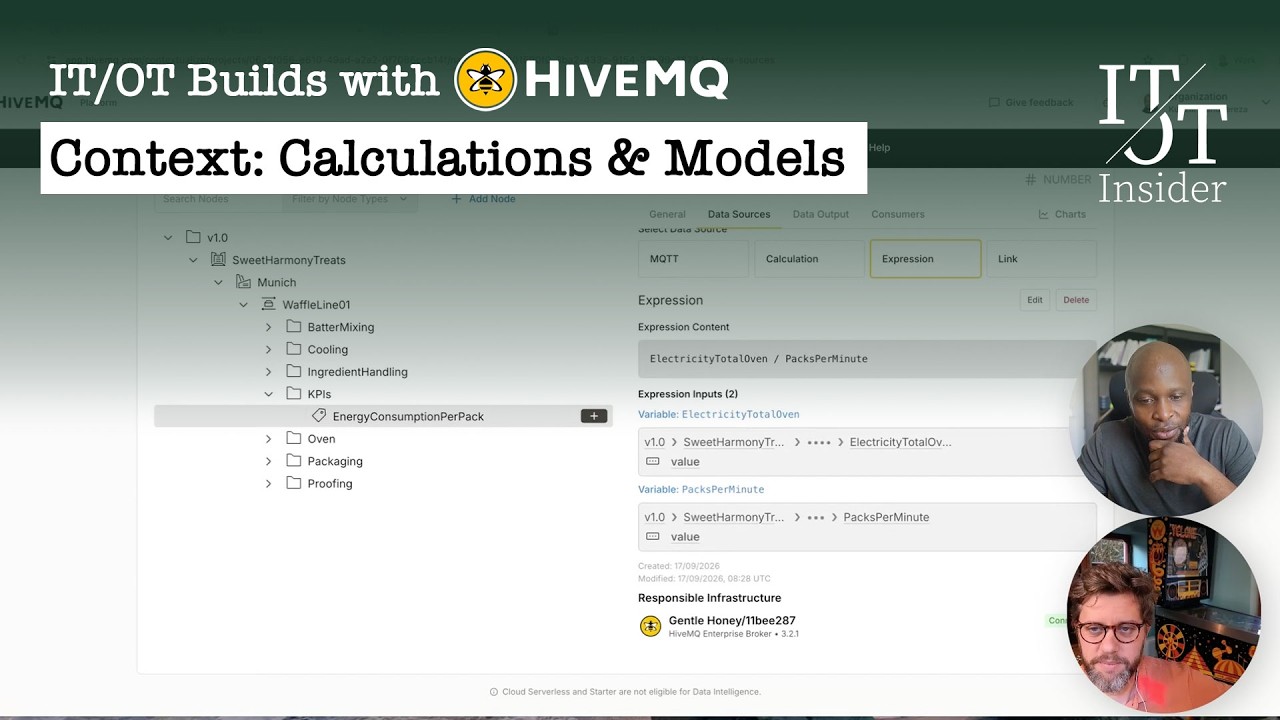
- The energy-per-pack KPI is built in the platform from an expression (electricity divided by packs per minute) and pushed to the edge, where it runs locally and feeds back into the bakery's HMI.
- Expressions go beyond arithmetic: a windowed simple moving average over the KPI, counted per value change, smooths the signal so it doesn't oscillate.
- David's realistic use case: instead of data spaghetti with CSV dumps and FTP exports, publish quality data on the broker and read it straight into the operator HMI.
- Any node, a KPI or an asset like an oven, can become a reusable data model and be instantiated on another line or site, which David sees as a real help for corporate data governance.
- Everything shown can be done today on your own workstation; David's advice is to create an account and try it out.
Contextualization Next: Calculations, KPIs and Sharing Data
00:00 – 01:35David opens the fourth HiveMQ episode of IT/OT Builds. With the platform introduced, a broker deployed and data collected in earlier videos, this one focuses on contextualization: creating KPIs, writing data back, and more.
The starting point is a first dataset with some initial structure, and the goal is to make it better, smarter and more contextualized, add calculations, and make the data available to other consumers.
“We start from having a first data set with some initial structure, and we wanna make it better, smarter, more contextualized, add some calculations, make that data available to other consumers.”
David Ariens · 00:49
Accessible, Understandable, Actionable
01:35 – 03:05Kudzai frames the data maturity journey manufacturers go through. First, make data accessible: de-silo it and get it out of systems, often with protocol translation, into consistent transport. Then make it understandable, the idea behind a unified namespace: this is the waffle line at the Munich site, with butter mixing, cooling and an oven, and these values are packs per minute and the oven's energy use.
But understanding alone isn't enough. The next step, and the focus of this video, is making data actionable and closing the loop.
“You want also to move on to the next step to make it actionable, because understanding data doesn't really move the needle.”
Kudzai Manditereza · 01:35
The HMI's One Data Point That Comes Back
03:05 – 04:08David brings up the vibe-coded Sweet Harmony Treats HMI as a reminder: not something to deploy in a real plant, but impressive from an engineering perspective, and he encourages viewers to try building such things themselves.
Everything on the HMI is generated by the system and flows into the broker, except one number in the top right: a value calculated elsewhere and sent back for operators to see.
“This data point is one which we're actually getting back.”
David Ariens · 03:39
Building the Energy-per-Pack KPI from an Expression
04:08 – 08:47Kudzai explains the number is an actionable insight that lets operators monitor energy use and set thresholds. To create it, he adds a KPIs folder to the waffle line, which automatically becomes a topic level, then an energy-consumption-per-pack tag with a decimal data type and history enabled.
The tag's source is an expression: electricity divided by packs per minute, again not perfect maths. The platform recognizes the variables, and Kudzai points each one at its source topic in the namespace. Once created, the calculation is enforced on the broker at the waffle line site, and the value starts moving on the HMI.
“This is kind of like what we mean by intelligence being generated at the edge.”
Kudzai Manditereza · 07:23
Running Locally, and What Expressions Can Do
08:47 – 10:12David underlines that the calculation doesn't run in the cloud or the platform; it runs locally on the edge broker.
Asked how advanced expressions can get, Kudzai says they cover general arithmetic plus things like rolling aggregates and simple moving averages, with the full list in HiveMQ's documentation. He activates the new KPI node, and the value shows up on the HMI.
“The calculation itself is not running in the cloud or in the platform. The calculation is running locally.”
David Ariens · 08:47
Smoothing the Signal with a Windowed Moving Average
10:12 – 12:47Kudzai adds a second tag, average energy consumption per pack, so the value isn't oscillating. Its source is a simple moving average expression over the KPI just created, which the platform helpfully suggests.
The average is windowed over a number of counts, say 20 or 100, where, David confirms, a count is every change in value. Once activated, the average also appears in the MQTT namespace at the edge.
“I also want to create a moving average of this value, so it's not oscillating.”
Kudzai Manditereza · 10:12
Beyond the Academic Example: Replacing Data Spaghetti
12:47 – 14:57David calls the energy KPI an academic example and offers a more realistic one: a quality system holds data points operators need to see. The old way is data spaghetti, with CSV dumps and FTP exports; the better way is to publish the quality data on the broker and read it into the HMI.
Kudzai sums up the move from understandable to actionable: data calculated at the edge, where decision-makers are, and consumed in real time through SCADA, Node-RED or engineering tools. The Act layer can also hand an insight to an AI agent to investigate and recommend actions, because skilled people don't always have time.
“An old school way of doing that: data spaghetti, dumping some CSV files, reading them, using some FTP exports, all the good stuff.”
David Ariens · 13:23
Reusable Data Models Across Lines and Sites
14:57 – 17:33David points to the video Can AI Run Your Plant? for more on what agents can and can't do, and suggests a dedicated video in the future.
Kudzai adds one more important feature: deriving a data model from an existing node, whether a KPI or an asset such as an oven, so it can be standardized and replicated across sites. He creates a second waffle line and instantiates the oven model on it, after first publishing the draft model, then maps it to the actual data.
“I can reuse what's already flowing, maybe from site one to site two, and then reuse all of those data models.”
Kudzai Manditereza · 15:46
Data Governance at Scale, and How to Get Started
17:33 – 19:16David sees reusable data models as a real help for corporate data governance. Both agree there's far more to cover, which just means more videos, including the agentic part.
Kudzai stresses that everything shown can be done today on your own workstation, and David's advice is simple: create an account and try it out. He invites viewers to request content, comment, message him or Kudzai, and subscribe.
“All the things that I showed here is literally something that someone can do right now in their own workstation.”
Kudzai Manditereza · 18:10
Full episode transcript raw feed ▸
David: Welcome back, this is still the IT/OT Builds where we are building solutions to technical problems. I'm still joined by HiveMQ's Kudzai Manditereza In this video, we will be showing you their contextualization capabilities in the platform. In previous videos, we already had a tutorial on how to connect. We gave you a platform walkthrough. We talked about their move from products to a platform. In this one, we're really gonna focus on the contextualization part. creating KPIs, writing data, et cetera. So without any further ado, enjoy this video. If you like it, make sure to subscribe, us a note. Always interesting to know what you want as next content. David: Okay, welcome back to the IT/OT Builds. This is still the HiveMQ series. We still have Kudzai with us. In previous videos, we already discussed quite a lot of things about the HiveMQ platform. We introduced what we are going to build. We also already have a broker deployed. We are collecting data. So all good stuff. If you haven't watched those videos, make sure to do that first. But Kudzai, in this one. we start from having a first data set with some initial structure and we wanna make it better, smarter, more contextualized, add some calculations, make that data available to other consumers, right? Kudzai: Yeah, absolutely. Thank you so much, David. It's great to be back here with you. So yeah, I I generally like to think about that progression that manufacturers go through in their data maturity as going from making the data accessible, because that is the first big part of it, just desiloing it and getting it out of the systems, so which may entail protocol translation and things like that. into a more consistent transport of connectivity software. And then from there, moving on to making it understandable, which is this idea of a unified network. So now we can actually understand what this data is. This is actually a waffle line that is running on the Munich site. And it consists of a butter mixing, cooling, oven, and things like that. So we understand this data. And then we can also see. all these different data points, can see that this is pecs per minute. And then we can see that is the, know, how much we're actually consuming as far as energy is concerned on that specific oven. So that is kind like making data understandable. But you want also to move on to the next step to make it actionable because understanding data doesn't really move the needle, right? You want to be able to say, OK, so this is where we want to show you now to make that actionable, something that can really, you know, sort of like, know, close the loop as it were, right? And then... David: Maybe just if you can just show the HMI back as a reminder to the audience. this is the HMI the operators at Sweet Harmony Treats are using. As we already mentioned in the previous video, it's not a real HMI, you Vibe coded this one. Again, pretty awesome stuff. And I highly recommend people to start playing around with these features themselves as well because it's really like. Okay, I will not be deploying this one at an actual Kudzai: yes. David: production plant, but just from an engineering perspective, awesome. And here on the right top, see, the audience see this number 1.3 something. And I think this is really interesting because where the system is generating data, obviously, and we have the belts and the oven and then all the good stuff is generating data. That data is flowing into the broker. But this data point is one which we actually getting back. Kudzai: Yes, absolutely. Yeah, so this is data that we're getting back as this actionable insight to let our operators or we have monitoring this to know exactly how much we're actually consuming at this specific moment. And then you can obviously set thresholds to this if you want to be able to take some action. So that is the next step. So how do we actually get that data back? First of all, how do we actually create that actionable? information as a train. So the first thing that I'm going to do is first and foremost in our waffle line here, as you know, as you can see, we don't have any way to represent our KPIs. So I'm going to start by creating a folder here, and then I'm just gonna call it KPIs, and then automatically it will assume this topic level that is called KPI. So I'll just create this one as an empty folder. And then within this folder, I then want to be able to create a tag. So this tag, basically, this is what we want to then use to capture our energy consumption per pack. So I'll just quickly put this information here. So this is the name of our node, energy consumption per pack. And then you can give it a description, but I'm not going to do that now. And then again here, will assume this topic level, but you can customize it like the topic doesn't need to be the same as the node name, but ideally you wanna keep this everything consistent. And then I'm going to give it a data type, know, the Decimal and then UTF-8 here. And then here I've got history also enabled for this specific one. And then on the data sources here, okay, so. First of all, I will need to create this child tag right here. So now where do we actually get this data for this specific tag? So in my case, you could get it from an empty topic, but in my case, I wanted to calculate it from existing tags in my namespace. So I could do that by creating a simple expression here. So I could say basically, electricity so I already know this this is where my you know Right divided by packs per minute. So again, as I mentioned, this is not really very, know, exact math or good math, but just to show you the point. So once I create that, the system itself already identifies the variable, It already identifies that this is a variable. it's not like it's reading this as a predetermined. So even if I remove it like this, the system still recognize it as a. David: Yeah, absolutely. Kudzai: as a variable and then packs per minute. Now I need to point to say what is the source of these variables. Again here, just jump into... I actually have got my notes here on this other window just for those of you. David: perfectly fine. Kudzai: So that we don't type things manually. I can go into edge source here. Then I know this one is actually flowing in this specific... topic namespace, so I'll just put it there, and then I'll select this one value. So this is how I'm this variable to this one. And then for this one, packs per minute, again, I'll grab the topic where it's running. And by the way, so this is really just me wanting to move here quickly, but you can pretty much just search through the whole namespace and step through it to find the data that you need to. able to build that calculation. So once I've done that, I can then click on create. So now we've created this new calculation that was not already existing in the namespace. And what has happened here, as David mentioned, just by doing that, automatically that topic is already running in that broker locally. So we created it at the application level, and then automatically it is enforced on the wafle line site. As you can see, our energy consumption is now moving. Previously, was just not static. just by creating that contextualization, giving it a topic level, automatically that gets pushed right down to the edge. So this is kind of like what we mean by intelligence being generated at the edge. David: Yeah, because I think that's important. The calculation itself is not running in the cloud or in the platform. The calculation is running locally. Kudzai: is 100%. David: And from an expression point of view, what are the types of expressions which are possible? Can I go to more advanced expressions as well? Or are they just simple plus minus divided by type of things? Kudzai: Yeah, it's really your general arithmetic, your David: Yeah. Kudzai: calculations, but you can also do things like rolling upgrades, Your simple moving averages, right? And things like that. So it's kind of like a wide range of actually calculations that you can do. So if you check on our documentation there, you can see what we were able to do. So now we have actually, again, to demonstrate here, we've actually created this KPI. Right. then what we can do right here, we can activate this one. Right. And then what I want to be able to do is this information is now showing up here on the on the HMI. David: Mm-hmm. Kudzai: But I also want to create a, know, as I mentioned, moving average of this value. Right. So it's not oscillating. So I really want to show you how that you could do that. So that is just to give you a sense of what. what is possible on this platform. So here I can then create. this So I'm recording it in average energy consumption per peg. So again here, I'll also select my data types. And then I'm going to go to data sources. So in this case, I'm going to, so previously we did the simple division. So in this case, I'm doing a simple moving average, right? And David: Mm-hmm. Kudzai: then I'll say energy consumption. So this is an expression, again, that you can do on this expression as it were. So now I can then specify the source. What do I need to calculate an average for? So this is where then I can then actually go to that energy value that I recalculated. So I'll just grab it from here. Okay, so it's already showing it up there. So I'll select, yes. David: It actually suggests the other one you created. Kudzai: Yes, already. Nice, David: Easy. Kudzai: so we'll then create a design. And then this one, obviously we need to say it's windowed, right? Because we're creating sort of like, want to create a window and then we can specify it's an average of how many counts. So I can say it's an average of 20 counts or a hundred counts or whatever. David: What is account? Account is a point which is every change. Or what is account? Kudzai: Yes, in this case, it's every change. Yes, David: Every change, yeah. Kudzai: every change. That is the count. Right. And then I can then create this one. and then activate this node And then we can then start to see an average here that is appearing here. Same applies with what we did also with just the energy consumption per pack. This also appears on your MQTT namespace right at the edge again. David: Yeah, yeah. And again, this is obviously just a more academic example. But the interesting thing here is that, the data is available. We are showing data being consumed by the HMI. I think a more realistic example is probably gonna be like, we probably have a quality system sitting somewhere and that quality system is getting some important data points for us. Now, somehow we wanna show some quality numbers to our operators, for example, Kudzai: Yes. David: what would be an old school way of doing that data spaghetti, dumping some CSV files, reading them, using some FTP exports, all the good stuff. But in this case, the better solution would be to publish that quality information on the broker and then read it back into the HMI, for example. Kudzai: Yes, absolutely. All right, so now we've really moved from making the data understandable to actually making it actionable. So as David mentioned, this is data that is flowing through at the edge where the people actually need this data to make decisions are actually located. So whether they're subscribing to that over an SCADA system, or they're subscribing to that over Node-RED, or they're using a specific process engineering tool, or whatever it is that you need to be able to. look at that data in real time as and when it is being calculated and then be able to take decisions right on that specific moment. And then, although I'm not going to go on and show you what that looks like, the act part, at this moment we did an overview video with David that shows that. But just to mention here that this is also where we are able to then delegate that task to an AI agent, for example. So we mentioned that this information is actionable by a skilled individual. But it's not always the case that you've got skilled people who got the time to investigate and go and do all of the stuff. So you may want to offload this to an agent to do the investigation and do a recommendation to that process engineer who then be able to take action to that. So this is all on the same platform, all of these different layers. David: I think we should also do a video on that in the future. In the meantime, we have a video called Can AI run your plant? Which is really interesting where we give some pointers on what is possible and what isn't possible and what are the bottlenecks. And you actually mentioned a couple of those bottlenecks in these and previous videos, good. So with that. Kudzai: And also just before we close that, another cool thing that I think we need to show you here, which is very important on this contextualize is that if I have defined this KPI right here, and maybe I want to standardize on this as a data model that I can then replicate across other sites, I can then select here, and then I can derive a new data model from this particular KPI. So it doesn't need to be KPI. David: That's interesting. Kudzai: it can be an asset, right? I can actually derive an oven asset as a data model, right? I can say, derive a new data model, and then I've got an oven asset as a data model. That can then be reused, right? So can save this as a draft. Or I can even create new, you know, if I go to the data models, I can create a new data model that I can, you know, define from scratch, but I can reuse what's already flowing, maybe from site one to site two. and then reuse all of those data models. So the way that you'd reuse that is to say, for example, I've created a data model of an oven. And maybe if I then go on and say, I want to add a new line here, right? And then just say, waffle line two, if I write that correctly. So now I have waffle line two. And then here, I can instantiate. that is a data model, then I can David: Yeah, that's cool. Yeah. Kudzai: pick my oven here and then get it to as a data model. So I already have this one that is, so I think I didn't publish this one. That's why it's not already available to be able to be instantiated. So it's David: Yeah. Yeah. Kudzai: already a draft here. So I need to publish it first. So once I publish it, I can then be able to instantiate that one here on this line, right? And then I can know whether I want to give it a new instance name. So I can say oven again. Oops. Right. And then now I would waffle line to already with my oven with all this pre built David: It Kudzai: and then I can then do the mapping from them. David: That's very interesting. That's also, I think also from a more, I don't really want to use the word, but more corporate data governance point of view. Yeah, this is something which can really, really, really help. Kudzai: yes, absolutely. David: Cool. Lots of things to digest. Thank you for joining Kudzai: yes. David: me again, could say. Kudzai: Thank you so much. Thank you so much, David. mean, always happy to come back and, know, only limited time, right, to really go through all of the capabilities of this platform. So I. yeah, absolutely. But David: but that just means we need to do more videos in the future. Kudzai: I hope I hope this really gives someone because all all the things that I showed here is literally that something that someone can do right now David: Yeah. Kudzai: in their own workstation. So I hope this is really enough information to get people started to investigate. And then if they have further questions, they can. then reach out. David: It's simple, create an account, try it out. Let us know what other content you'd like to see from us from HiveMQ Drop a comment, send me a DM, send a message to Kudzai or just subscribe to our channels to get all new inputs directly into your feeds. Kudzai we'll definitely do some follow up on that. We need to do some extra videos and I'm very interested also in the agentic part. That's definitely a topic for the future. But until then. Thank you for joining into our audience. Thank you for tuning in. Kudzai: Thank you so much, David. Really appreciate it. David: Bye bye.